- cross-posted to:
- selfhosted@lemmy.world
- cross-posted to:
- selfhosted@lemmy.world
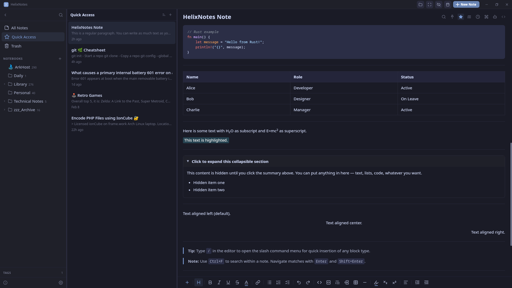
I built a note-taking app because the one I wanted didn’t exist. Clean UI, local .md files, no cloud, no account.
Built with Rust + Tauri 2.0 + SvelteKit. Full-text search powered by Tantivy. Graph view, AI writing tools (bring your own key), Obsidian import, version history.
Available for Linux (AppImage, APT, AUR), Windows, and macOS. Source: https://codeberg.org/ArkHost/HelixNotes
You must log in or # to comment.
AI writing tools — improve, summarize, translate, and more (Anthropic / OpenAI)
why though
Fair question. Use case: you take rough notes during a meeting, no formatting, just raw thoughts. AI can clean them up, summarize, or restructure after the fact. It’s completely optional though. Disabled by default, doesn’t even show in the context menus unless you explicitly configure it in settings with your own API key. If you don’t want it, it’s like it doesn’t exist.
So, a feature for those who want it, but turned off out of the box for those who absolutely do not want it? Did I understand correctly?
Exactly. Off by default, invisible unless you enable it.
As ai features should be. You’re the dev?
Correct. Yes I am.
Cool. I appreciate this design decision. If only more went that route (looking at you, Microslop)
I see on the page it says you can bring an anthropic or openai key. Can I also point it at my own locally hosted model?
Not at this moment. Which local model would you like to see as an additional option?
Ollama, lmstudio, llama.Cpp
Ollama is now also possible.
What does it do that obsidian doesn’t? Why would I switch? Genuinely interested.
Note taking App, AI in the front page… I don’t think you understand the point of taking notes.
Is the Markdown editor WYSIWYG, like Typora ?
You have both - the WYSIWYG editor and a way to switch to the Markdown editor.
I specifically asked whether the Markdown editor is WYSIWYG, like Typora, which isn’t the same thing as MS Word WYSIWYG.
Notix. Notes + helix avoid confusion with the other app, Notix
I need my notes with me. I use SiYuan and I’m more than happy
Never worked with any note taking apps except for Vim with customized snippets and rudamentary helper scripts.
While such an app seems very appealing, I haven’t seen any of them featuring the useful stuff, such as pluggable editor (in my case Vim or NeoVim), template support (day journal, meeting, README etc…), rendered fields (e.g.: today, author, or arbitrary values), support for pandoc rendering, doc metadata management (tags, keywords, related docs, links) or markers in text eg. @TODO etc… (idea being to aut. create lists of paragraps with such markers)
What’s the point of a note taking app that provides help with editing single docs and maybe with rendering to HTML, but doesn’t help organizing and remembering stuff?
Different use case. HelixNotes is for people who want a clean, simple note-taking app that works out of the box - not a customizable text processing pipeline. If Vim snippets work for you, stick with that. Not every tool needs to be for everyone.
Since this looks to be similar to Obsidian, why not name it something else like it, but without the Obsidian name?
I’ll need to do some numerology on that…
EDIT: On the note of Obsidian, my producer and I use it all the time, however, there is another one that someone in a community I’m in looked at, that being Trilium Next. Judging by the looks, it’s got similarities to Trilium, which is actually pretty nice.
The name comes from the double helix. Structured but flexible, like how notes should be. Trilium is a solid project, but it stores notes in an SQLite database and runs on Electron. HelixNotes keeps everything as plain .md files and uses Tauri, so much lighter on resources.
Is Tauri like Electron, or SQLite, but faster and FOSS? Are either of those what I’m getting at?
Tauri is an alternative to Electron. Both are frameworks for building desktop apps with web technologies, but Electron bundles a full Chromium browser (which is why Electron apps use so much RAM). Tauri uses your OS’s native webview instead, much smaller, much lighter. Both are open source. The difference is resource usage.
Since my producer and I are using the Odin Project to potentially learn full-stack JS after the foundations course completion on our end (Rails is another option for full-stack development), we could certainly look into Tauri (even if we’re not done with that yet). I wonder, however, why many apps don’t use Tauri, and instead, Electron.
Electron came first and has a massive ecosystem. Most apps were built before Tauri was mature enough. Switching frameworks is expensive, so existing apps stay on Electron. New projects are increasingly picking Tauri though.